Kids’ resale marketplace with school and club Hubs · October 2026

A fake “support” account with a verified badge

What the operator asked for

A member named after the marketplace, with the bio “Official … Support”, showed a verified badge five minutes after signing up and contacted a real seller. A member reported it; the operator banned the account 36 hours later. The question, pasted into a support case on the day the marketplace was connected: how did they get verified, what did they do, and are there other accounts like this?

The problem

A verified badge on a brand-new account is what makes an impostor believable. The operator needed the mechanism, the account’s activity, and any look-alikes, from data they had never had in one place.

What Empavision did, step by step

  1. 1

    The case, as the operator asked it

    Pasted as written, with the member’s name and email. The marketplace had been connected to Empavision the same morning.
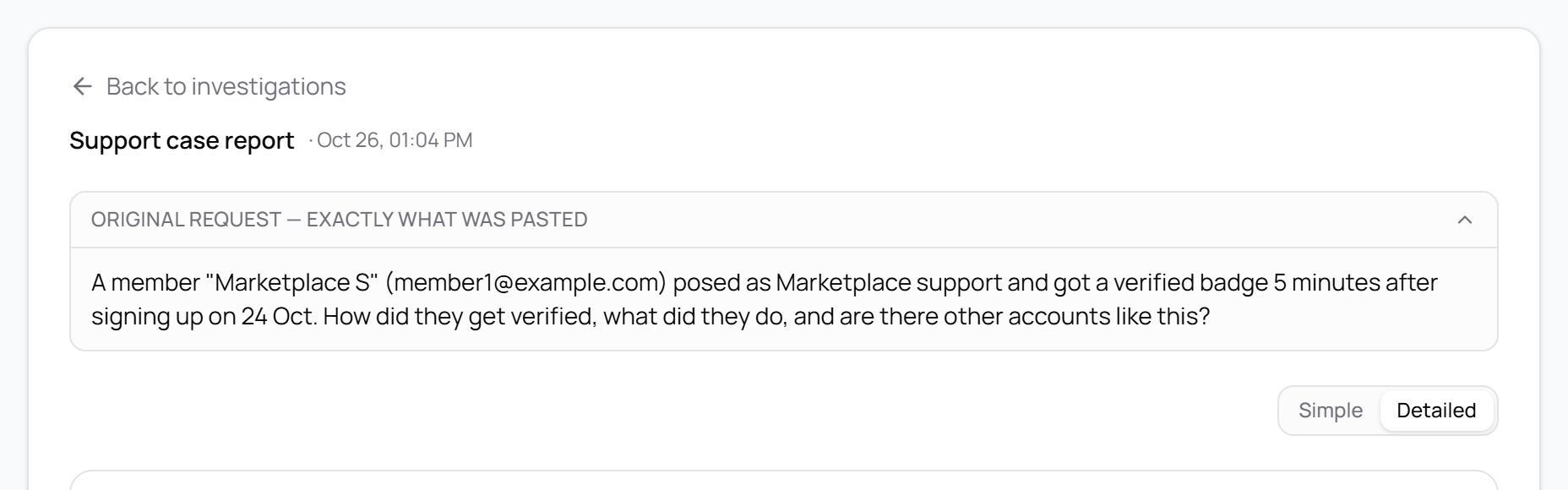
    The original request: a member named after the marketplace posed as support and got a verified badge five minutes after signing up
    The request as pasted. Names, emails and ids are replaced.
  2. 2

    The first answer: the facts right, the case missed

    “They are verified, but Empavision cannot show how.” Every fact about the account was correct and cited, and it said plainly what it could not see. But it had no history from before the connection, never looked at what the account did, and searched for look-alikes on the incident day only. Its plan pointed at staff tools: the wrong direction.
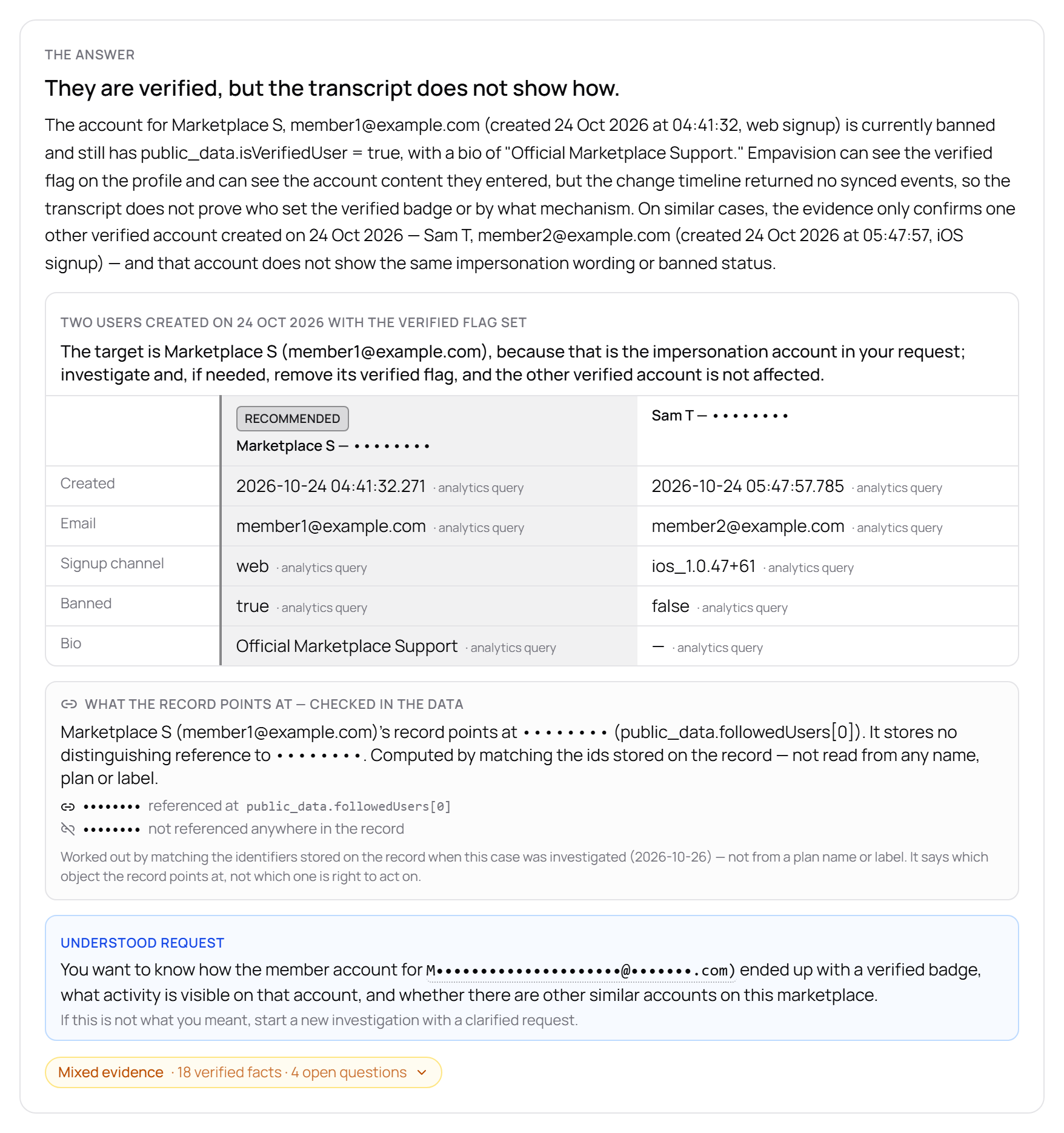
    The first answer: the account is banned and still carries the verified flag; no change history shows who set it
    The first answer, as the operator saw it. Names, emails and ids are replaced.
  3. 3

    What was fixed in Empavision, the same day

    Connecting a marketplace now also stores its last 90 days of change history, without replaying it. The change history says who wrote each change: the member’s own session or the operator’s tools. Before the report says who set a flag, a new check compares that member’s write with every other member’s write of the same flag. A new step lists everything a member did through transactions. Look-alike searches cover the whole marketplace, strongest matches first, and long result lists are no longer cut short before the report is written.

  4. 4

    The same question, asked again

    “The badge appears to be app-set, not manually granted.” The report compared this account’s badge write with every other member’s: the same member-session source as 209 writes across 177 members, seconds after an email is confirmed or a payment account is created, so the marketplace’s own app granted it. The real seller this account targeted got her badge the same way. The impostor confirmed its email, created a payment account without finishing the identity checks, and the app granted the badge 14 seconds later. It then opened three enquiries, 25, 26 and 27 minutes after sign-up, all to one seller on one listing, with no message in any of them.
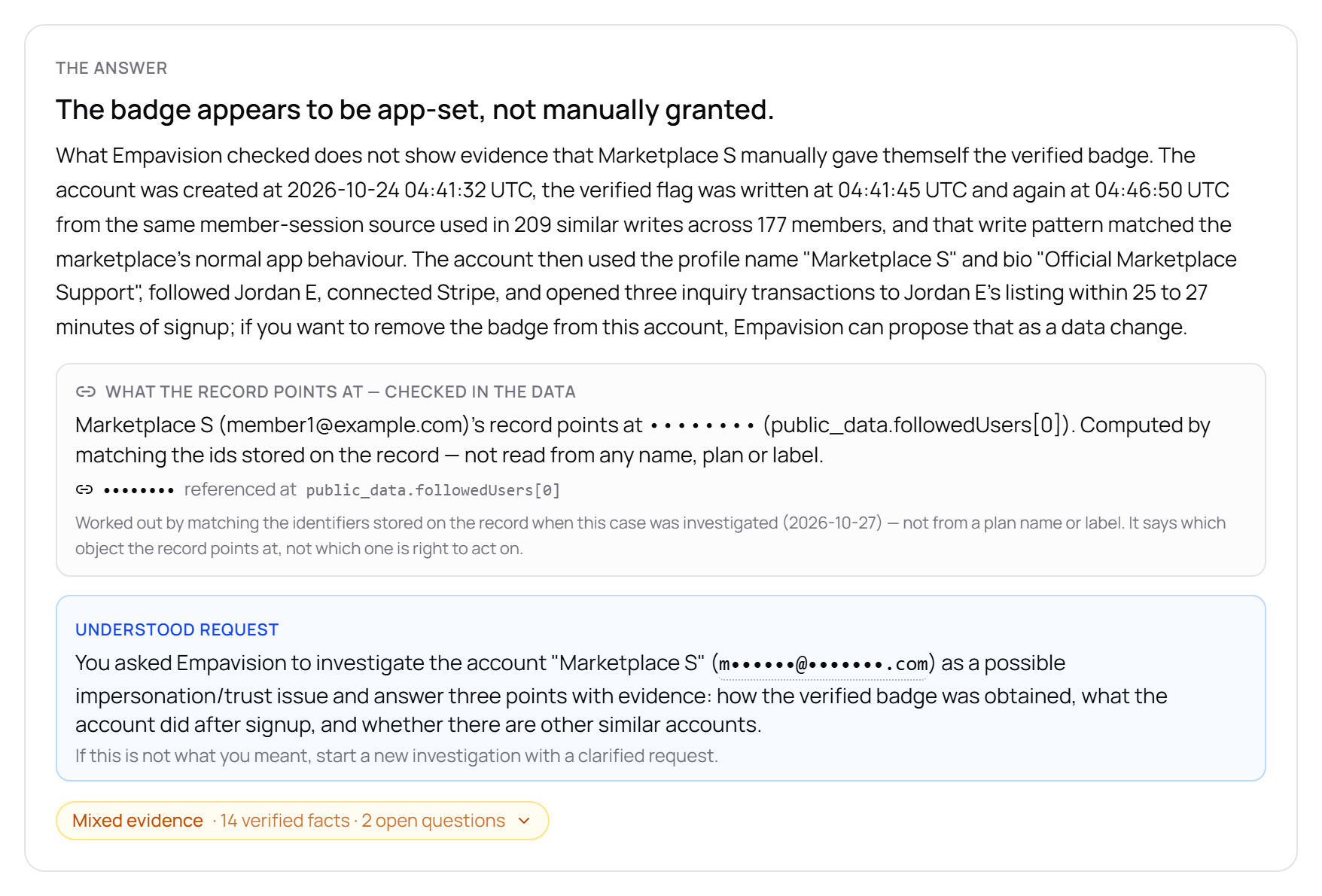
    The answer after the fixes: the badge appears to be app-set, not manually granted; three enquiries without messages to the same seller
    The answer after the fixes, as the operator saw it. Names, emails and ids are replaced.
  5. 5

    The look-alikes, by name

    A second account built from the marketplace’s name, created two months earlier and never banned, plus the marketplace’s own shop account. Schools and clubs came up for staff words like “team”; the report lists them for review and does not call them abusive.
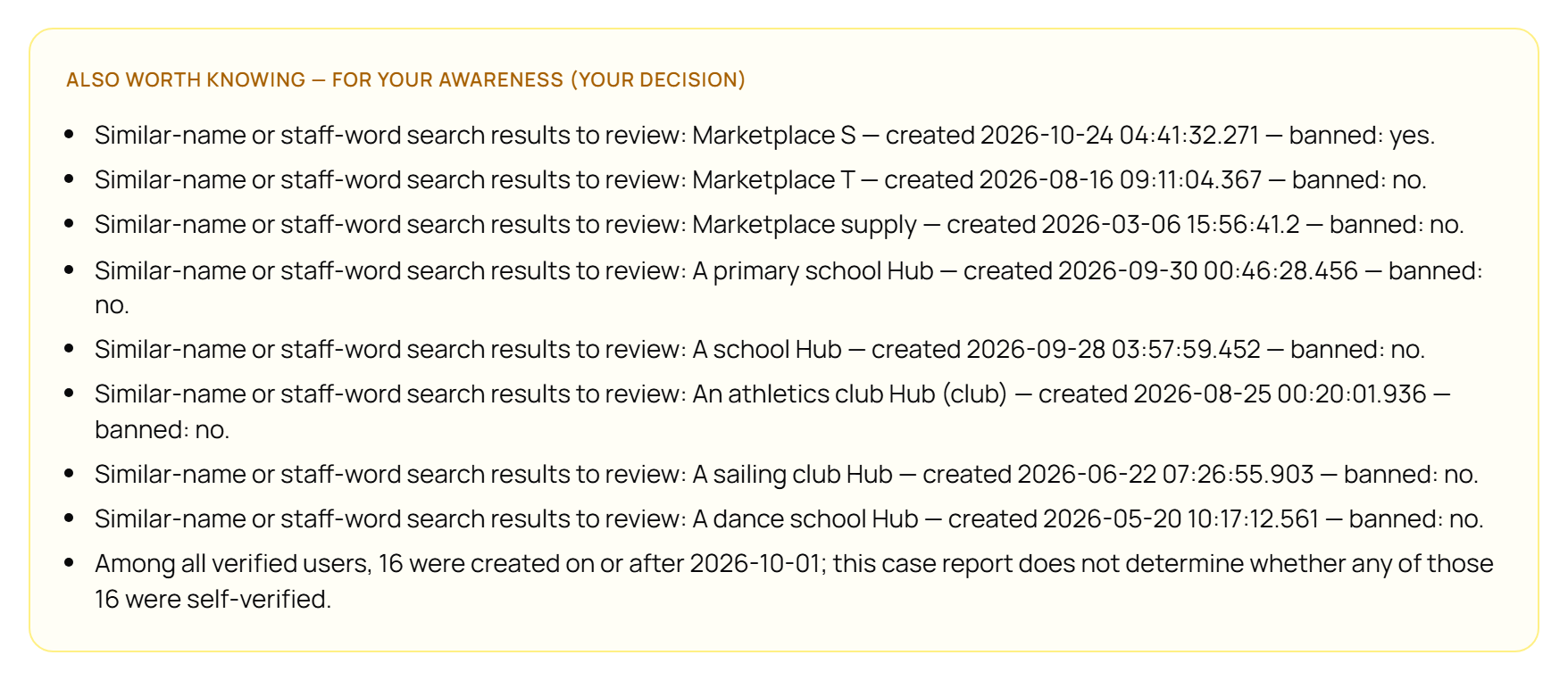
    Look-alike accounts listed by name, created date and ban state: a second account named after the marketplace, the marketplace’s shop, and several school and club Hubs
    Look-alikes as the operator saw them. Names are replaced.

Verified after

  • ✓Checked against the marketplace’s own event log, read independently: the flag was written from the member’s session at the second the report gives, the same way and after the same trigger as for every other member, and the three enquiries carry no messages.
  • ✓First answer in 2 minutes, the answer after the fixes in under 2 minutes, both on a marketplace connected the same day.

What did not go well

An earlier run’s headline said the member “self-set” the badge, an intent the event log does not show; it was retracted the same day. The method now compares a member’s write with every other member’s write of the same flag before it says who set it.

The first answer missed the mechanism, the activity and the second look-alike. It was honest about what it could not see, but an operator could not act on it.

Some runs tie the badge to the payment account created 14 seconds earlier, which is the real trigger; others leave that link out. The event log says it every time.

Finding a case after the fact is not catching it. The detection that would flag such an account within minutes of sign-up is being built from this case.
Empavision features used

Support cases

House-sitting marketplace with paid memberships · October 2026

The housesit that “disappeared”

What the operator asked for

A homeowner wrote that her upcoming housesit and the messages with her sitter had disappeared, and asked whether the latest update had wiped data. The operator pasted her words and five WhatsApp screenshots into a support case.

The problem

The screenshots showed an account with “Transactions: 0”. Taken at face value, the data was gone.

What Empavision did, step by step

  1. 1

    The screenshots were read, as claims

    One vision pass transcribed the names, emails, user id and dates in the pictures. They entered the investigation as operator-pasted values to check, never as evidence.

  2. 2

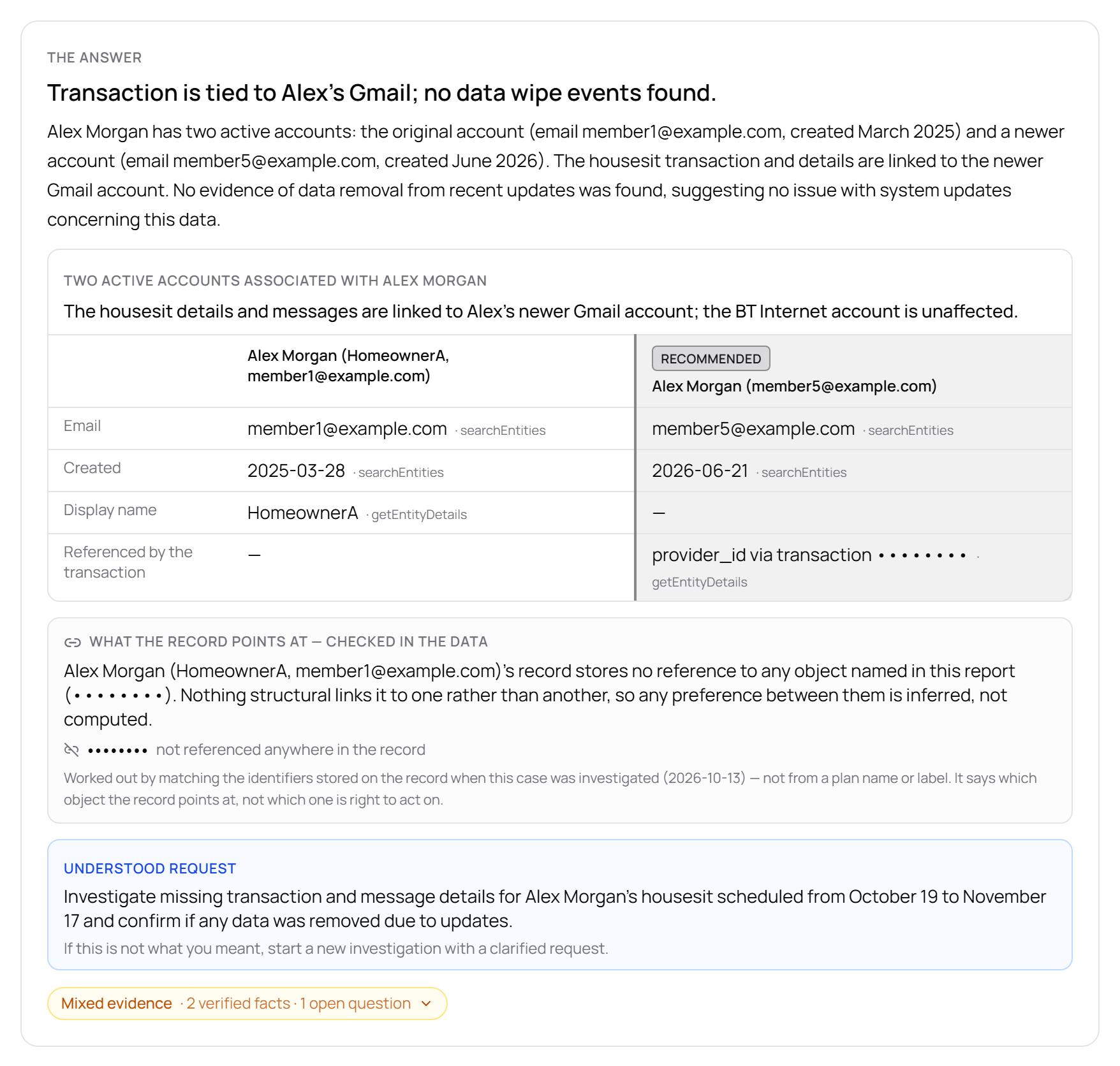
    Two accounts for the same homeowner

    One created in 2025 on one email address, one in 2026 on another. The screenshots showed the older one.

  3. 3

    The booking bound to the newer account

    The transaction’s provider id pointed at the 2026 account. The change log held no deletion events.

  4. 4

    The answer, and a one-step plan

    “Data loss not observed; housesit linked to a different account.” Both accounts side by side, the newer one marked recommended. The plan: one decision step, tell the member which account to sign in with, plus a drafted reply. A later run proposed deactivating the unused account as a reversible step.

    The answer: two active accounts for the same homeowner side by side, the newer one marked recommended, no data-removal events found
    The answer as the operator saw it. Names, emails and ids are replaced.

Verified after

  • ✓Matched a hand investigation (mirror queries plus the Integration API) point for point.
  • ✓2.0 minutes as text, 2.2 minutes with the five photos.

What did not go well

The screenshots showed the wrong account. The investigator found the right one because it treated what it read in them as claims, not facts.

With the photos, the plan came out more hedged than in the text run (“confirm which account she prefers”). Watched on the next real case.

Empavision features used

Support casesScreenshots in a case

House-sitting marketplace with paid memberships · September 2026

602 members at the same dead end

What the operator asked for

A member who had never completed checkout saw “incomplete_expired” and a Cancel button on her subscriptions page, with no way to renew.

The problem

The state came from a Stripe subscription that was never paid, mirrored as it was. The page offered an action on it and hid the one action that mattered: choose a plan.

What Empavision did, step by step

  1. 1

    One ticket, then a count

    The investigation traced the state to the unpaid subscription. A count against the mirror showed 602 members on the live marketplace in the same state.

  2. 2

    The fix on the marketplace’s own page

    The subscriptions page now states the membership in plain words, always offers “Choose a plan” when nothing is live, and shows never-paid or ended objects as history with no actions. Deployed by the marketplace’s developer.

  3. 3

    The mirror became event-driven

    Stripe subscription events now update Empavision’s copy within a second; the nightly run stays as reconciliation.

Verified after

  • ✓Recorded test on the dev marketplace, then live: a test subscription created, updated and cancelled was mirrored within one second of each event.
  • ✓The live page served the new state the same morning.

What did not go well

The fix was code on the marketplace, not a button in Empavision. Empavision found the scope (602, not 1) and keeps the copy current.

Empavision features used

Support casesStripe mirror

House-sitting marketplace with paid memberships · September 2026

“A list of expired homeowners”: none, while 149 existed

What the operator asked for

In the Copilot: “give me a list of expired homeowners”.

The problem

The answer was “none”, while the marketplace had expired members. The stored generated query showed the cause: “expired” had been read as account standing (banned, not active) instead of membership status.

What Empavision did, step by step

  1. 1

    The cause, from the stored query

    Every Copilot answer keeps the query it ran. This one filtered on account state, which no expired member has.

  2. 2

    Membership words now mean membership

    On a marketplace with a Stripe subscription mirror, “expired”, “lapsed”, “cancelled”, “not renewed” resolve against Stripe’s own statuses through the member’s most relevant subscription. On a marketplace without the mirror they fall back to marketplace fields, and the answer says which.

Verified after

  • ✓The same question in the real chat returned 149 members, answered from Stripe and the marketplace together, with an export.

What did not go well

A wrong answer, given with confidence. Nothing on the screen said it was wrong; only the stored query did.

Empavision features used

AI Copilot

House-sitting marketplace with paid memberships · August 2026

Moving a membership to the account the member actually uses

What the operator asked for

A member had two accounts. Her paid membership and her billing were on the one she no longer used. Move them to the account she keeps.

The problem

The membership lived in two places: the Stripe customer (billing email) and the marketplace record (the entitlement, with dates). Both had to move, with the right types, or the member would pay on one account and be denied on the other.

What Empavision did, step by step

  1. 1

    The investigation found both accounts and the Stripe customer

    With the dates of each membership read from Stripe, not from the marketplace’s copy.

  2. 2

    The first attempt refused a step it could not verify

    The step did not pass the live pre-check, so nothing was written. The pre-check was fixed, the case re-run.

  3. 3

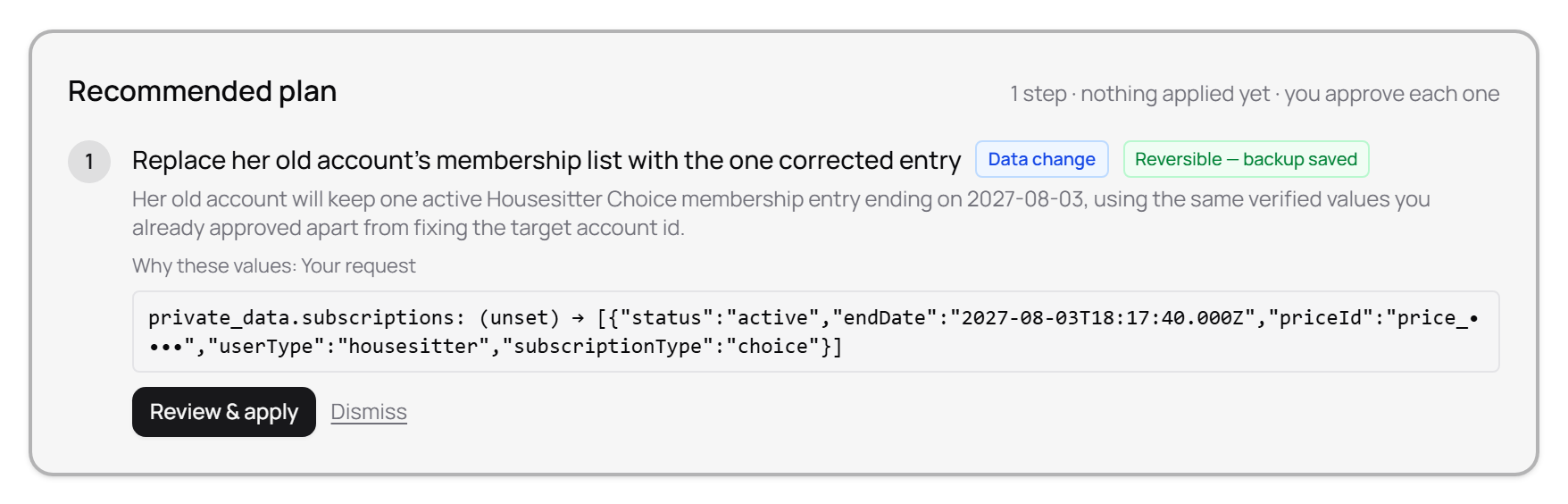
    Billing email changed, entitlement copied

    Each step shown as before → after in the approval modal and applied with a receipt. A follow-up turn corrected the entitlement step; it was re-applied once a writer fix landed, with the stored value now the right type.

    Recommended plan with one data change: replace the old account’s membership list with the corrected entry, marked Reversible — backup saved
    The corrected entitlement step, before approval. Ids are masked.

Verified after

  • ✓Billing email verified live on Stripe after the change.
  • ✓The entitlement on the kept account, with correct types and dates, all audited with receipts.

What did not go well

Three product fixes came out of this case: an ownership check on the customer update, the merge rule moved into the plan synthesis, and JSON-shaped values decoded correctly before writing. The case took longer than it should have.

Empavision features used

Support casesOperations receipts

House-sitting marketplace with paid memberships · August 2026

Duplicate account, or one account with two memberships?

What the operator asked for

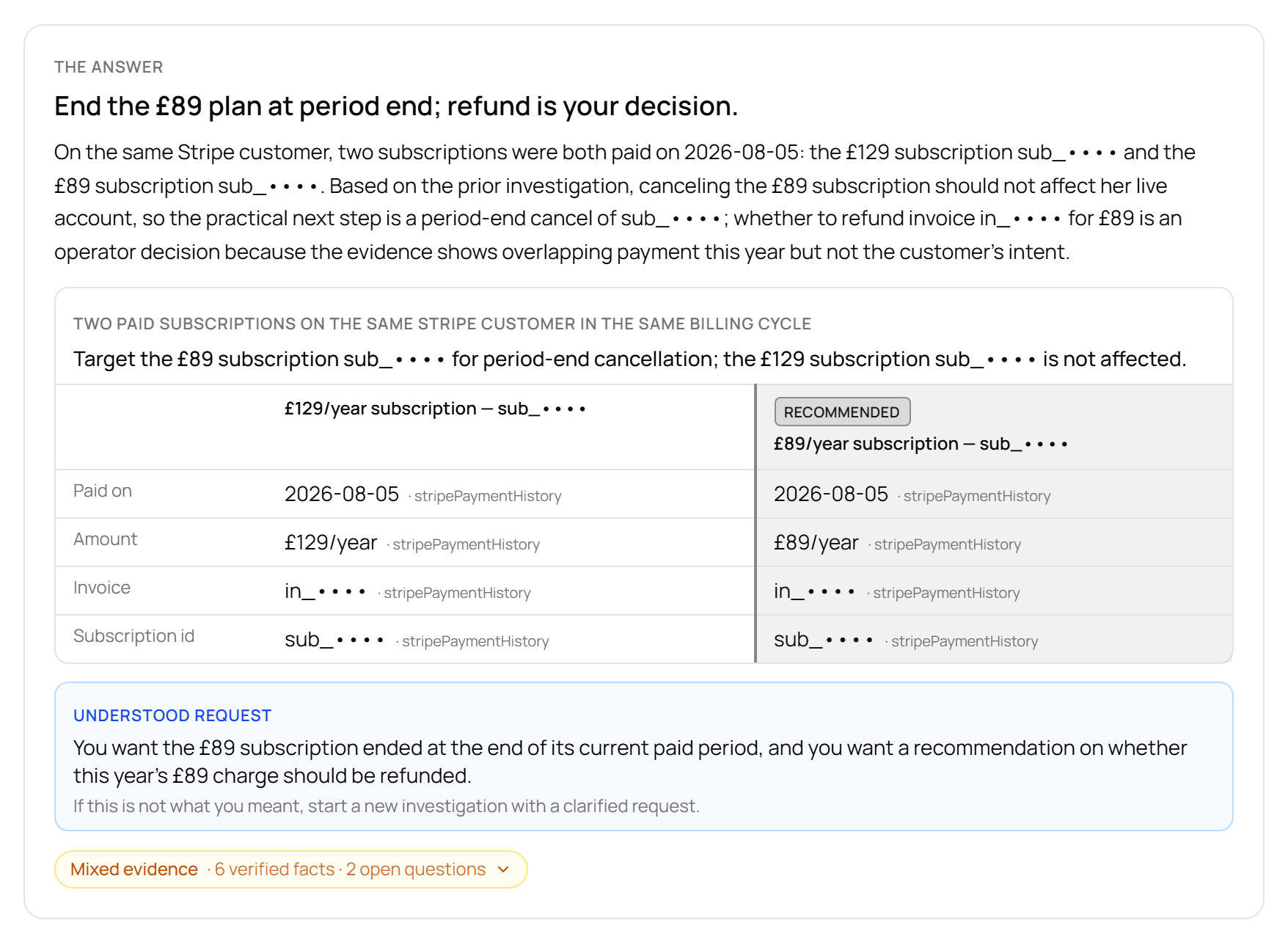
“Duplicate account — can I cancel this £89 subscription, or will it affect her live account?”

The problem

The premise was wrong. There was one account and one Stripe customer, with two active yearly memberships: £89 since July 2024 and £129 since July 2025, both invoiced every July. The marketplace record referenced only the £129, so from the marketplace’s side the £89 did not exist.

What Empavision did, step by step

  1. 1

    Who is who, with dates and amounts

    The investigation listed every subscription on the customer with its start date and amount, instead of trusting the “duplicate” label.

    The answer: two paid subscriptions on the same Stripe customer compared side by side, £129 and £89 a year, the £89 one recommended for cancellation
    The answer, on the dev-marketplace copy of the case. Stripe ids are masked.
  2. 2

    The remedy

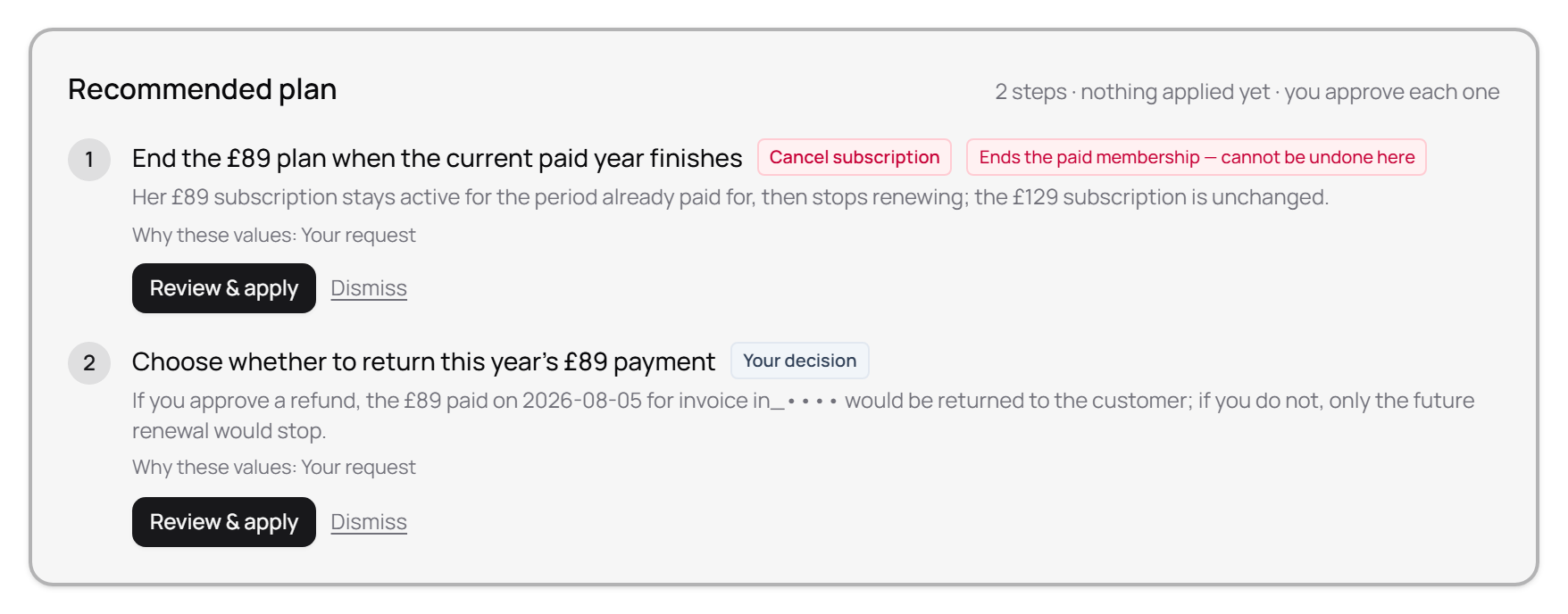
    Cancel the £89 at period end, keep the £129. A refund of the latest £89 charge left as the operator’s decision, with the amounts in front of her.

    Recommended plan: end the £89 plan when the paid year finishes, then choose whether to refund this year’s £89 payment
    The plan: the cancellation is flagged as not undoable, the refund is the operator’s decision.
  3. 3

    What else was in the data

    Dead twin subscriptions from double-fired checkouts, raised with the operator rather than silently cleaned.

Verified after

  • ✓The same situation was cloned onto the dev marketplace (role-neutral names, real dates) and the investigator’s answer is checked automatically before every change to it: who is who with dates and amounts, and the money step bound to the right subscription.

What did not go well

An earlier version of the investigator asserted “duplicate” with no discriminating numbers. The rule now: an operator’s label is a claim to verify.

Empavision features used

Support casesStripe cross-check

House-sitting marketplace with paid memberships · August 2026

Repairing a type defect the product itself wrote, through the product

What the operator asked for

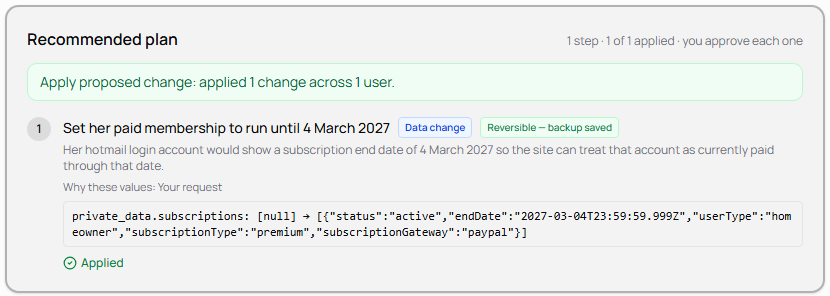
In a support case on one member's account, the operator had approved a plan step: set the member's paid membership to run until 4 March 2027.

The problem

Empavision's own apply flow wrote the membership field on that member's record as a JSON string instead of an array. The values were correct; only the container type was wrong.

It stayed invisible for four days. Earlier in the same case thread, a step had switched on the marketplace’s own skip-check flag, the escape hatch that makes a broken membership field harmless. The workaround applied earlier in the thread suppressed the signal for the defect introduced later in it.

The defect was found by verifying the write itself (the stored JSON type), not the receipt. The receipt said “succeeded”, and it was telling the truth.

Member records on the marketplace, by stored type of the membership field
arraystring
before the repair5,6731
after the repair5,6740

What Empavision did, step by step

  1. 1

    The writer was fixed first

    Only text shaped like a JSON array or object that actually parses is decoded; plain values are left untouched.

  2. 2

    The case was reopened from the case list

    The whole thread reopens from its list row: the operator's original request, the investigation, the plan and their history.

  3. 3

    The stored plan step still offered “Review & apply”

    The record was repaired by re-running the same approved step from the same stored report. No new values, no hand-written SQL.

  4. 4

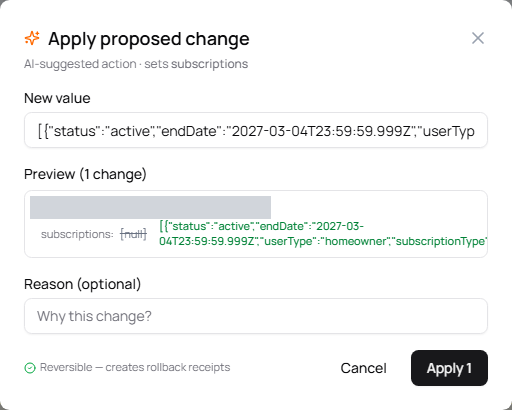
    The approval modal: before → after, and the guarantee

    The operator sees the field, the current value and the new value before approving, and the line “Reversible — creates rollback receipts”.

    Apply proposed change dialog showing the subscriptions field before and after, marked Reversible — creates rollback receipts
    The approval modal. The member line is masked.
  5. 5

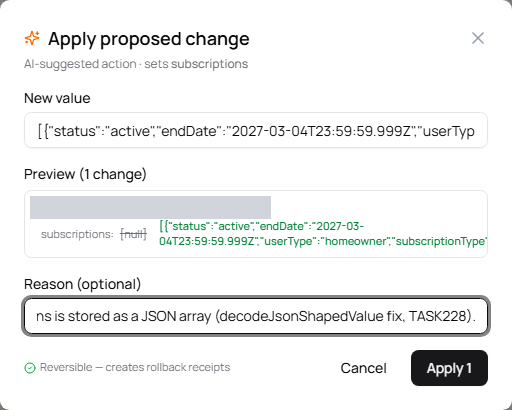
    A reason, recorded on the audit receipt

    Optional, but kept with the receipt, so the audit trail says why, not just what.

    The same dialog with a reason typed into the Reason field, ready to apply
    The reason entered before applying. The member line is masked.
  6. 6

    “Applied 1 change across 1 user”

    The plan step is marked applied, with the exact before → after value and “Reversible — backup saved”.

    Recommended plan card reading Apply proposed change: applied 1 change across 1 user, with the step marked Applied
    The applied plan step.

Verified after

  • ✓The stored type of the membership field is now an array, with one entry: status “active”, end date 4 March 2027, payment gateway recorded.
  • ✓The membership level label and the skip-check flag are intact.
  • ✓The rollback payload captured the real prior value (the string), so the change is genuinely reversible.

What did not go well

The modal’s before → after preview showed the value as of the report’s date, not a live read; the executor read the record correctly, so the write was sound, but the operator approved against a stale “before”. Filed as a defect: show a live “from”, or say plainly that the before-value is as of report time.

Empavision features used

Support casesOperations receipts

Ready to see this on your own marketplace?

Connect your marketplace in 2 minutes. Free during the founding operator program, no credit card.